Project Tracker
Track Projects
Overview
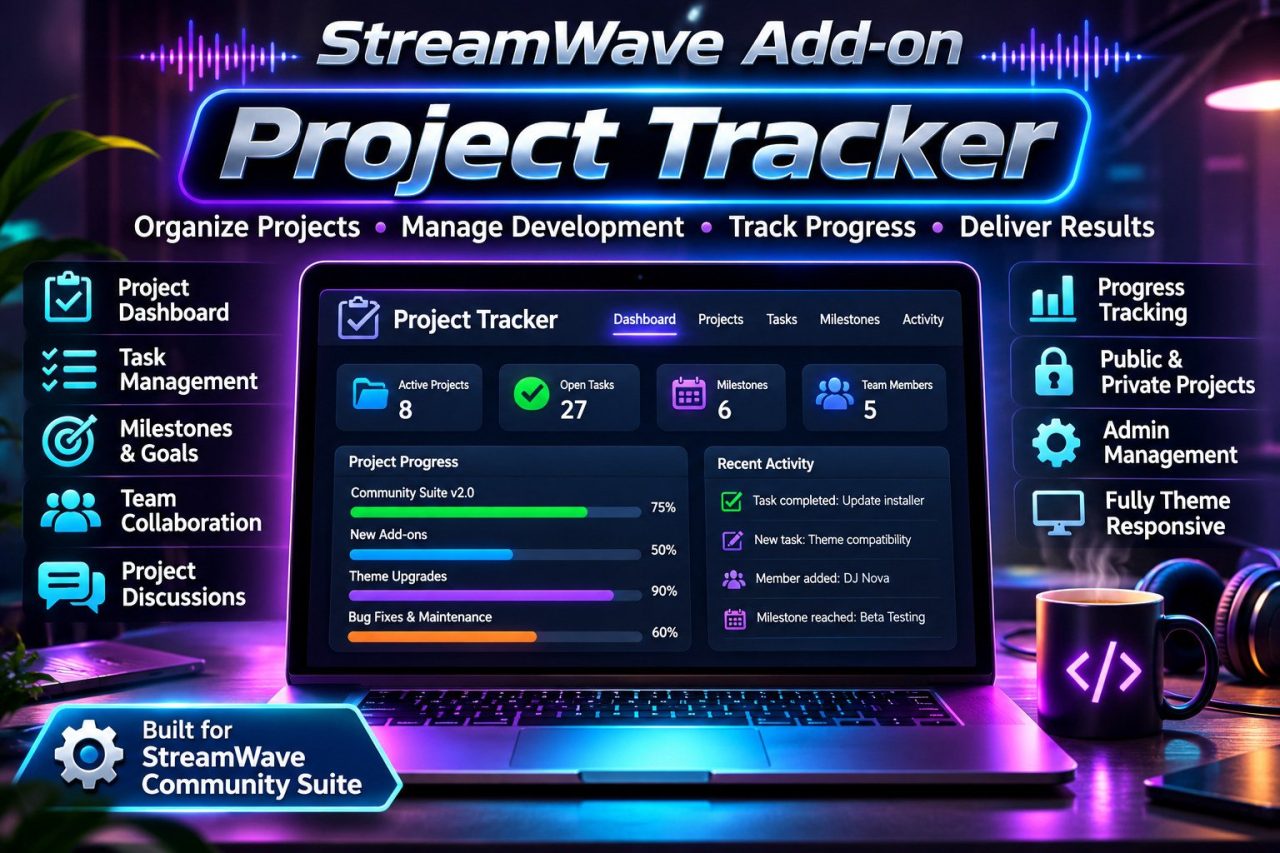
 StreamWave Add-on Project Tracker
From Concept to Completion.
Version 1.0.1 — Community Development & Project Management SystemOrganize Projects. Manage Development. Track Progress. Deliver Results.
Take control of your community's development projects with StreamWave Add-on Project Tracker, a project management system designed exclusively for StreamWave Community Suite.
Whether you're developing new add-ons, improving existing features, managing bug fixes, or coordinating a team of contributors, Project Tracker brings your entire development workflow together in one convenient location.
No more scattered discussions, forgotten tasks, or uncertainty about development progress.
Keep your projects organized, your team connected, and your development moving forward!
 Centralized Project Dashboard
Manage multiple development projects from one organized dashboard.Quickly review active projects, monitor progress, and identify areas requiring attention.
Features include:
- Centralized project overview.
- Multiple project management.
- Project status monitoring.
- Progress indicators.
- Quick access to development activities.
 Advanced Task Management
Break development projects into manageable tasks and keep everyone focused.Task management features include:
- Create development tasks.
- Organize tasks by project.
- Assign responsibilities.
- Set task priorities.
- Monitor completion.
- Track outstanding work.
 Automatic Progress Tracking
Follow development progress through visual indicators.Project completion percentages update as tasks are finished, making it easier to understand how much work has been completed.
Features include:
- Visual project progress indicators.
- Automatic completion percentage updates.
- Task-based progress tracking.
- Clear development status visibility.
 Milestones & Development Goals
Keep large projects manageable with structured milestones.Set important development targets, establish deadlines, and track progress toward completion.
Milestones help organize:
- Feature development.
- Testing goals.
- Release preparation.
- Bug-fix targets.
- Major development objectives.
 Team Collaboration & Member Assignments
Bring your development team together.Project Tracker allows administrators to assign members to projects and coordinate responsibilities.
Username-Based Assignments
Members are selected using their existing community usernames.No confusing numeric member IDs are required.
Collaboration features include:
- Project member assignments.
- Contributor management.
- Shared development responsibilities.
- Team coordination.
- Existing community account integration.
 Project Discussions & Feedback
Keep development conversations connected to the projects they belong to.Contributors can:
- Discuss proposed improvements.
- Share development ideas.
- Report issues.
- Provide feedback.
- Collaborate on possible solutions.
 Development Activity History
Maintain a record of project changes and development activity.Activity history helps administrators and contributors understand how projects have progressed over time.
Benefits include:
- Greater development transparency.
- Easier tracking of project changes.
- Improved team communication.
- Better visibility into ongoing work.
 Public & Private Projects
Not every development project needs to be visible to the entire community.Project Tracker supports different visibility settings.
 Public Projects
Share development progress with community members.Ideal for:
- Public development roadmaps.
- Upcoming add-on releases.
- Community-requested features.
- Visible software improvements.
 Private Projects
Keep internal development activities restricted.Ideal for:
- Administrative projects.
- Internal planning.
- Private development work.
- Restricted team collaboration.
 Administrator Project Management
Project Tracker provides dedicated administrative capabilities for overseeing development activities.Administrators can:
- Create projects.
- Organize development tasks.
- Manage project assignments.
- Monitor progress.
- Coordinate milestones.
- Oversee project activity.
- Manage project visibility.
 Fully Theme-Responsive Interface
StreamWave Add-on Project Tracker is designed to complement the active StreamWave Community Suite theme.The interface adapts to:
- Dark community themes.
- Light community themes.
- Custom theme color schemes.
- Desktop browsers.
- Tablet displays.
- Mobile layouts.
 SQLite Database Integration
Project Tracker uses SQLite storage and integrates with the existing Community Suite environment.Integration benefits include:
- Existing community member accounts.
- Username-based member identification.
- Project and task storage.
- Milestone tracking.
- Development activity records.
- Community authentication integration.
 Perfect For
StreamWave Add-on Project Tracker is ideal for:- Forum add-on and plugin development.
- Theme creation and maintenance.
- Software feature development.
- Bug fixes and maintenance projects.
- Community improvement initiatives.
- Collaborative development teams.
- Public development roadmaps.
 Key Features at a Glance
- Centralized project dashboard.
- Multiple project management.
- Advanced task management.
- Task priorities.
- Member task assignments.
- Automatic progress tracking.
- Visual completion indicators.
- Development milestones.
- Project deadlines.
- Team collaboration.
- Username-based member assignments.
- Project discussions.
- Development feedback.
- Activity history.
- Public and private projects.
- Administrator management tools.
- Existing member account integration.
- SQLite database support.
- Theme-responsive interface.
- Community development workflow integration.
 Why Choose StreamWave Add-on Project Tracker?
Managing software development through ordinary forum discussions can quickly become difficult.Important tasks get buried, milestones become unclear, and contributors may struggle to understand project priorities.
StreamWave Add-on Project Tracker provides a dedicated workspace where development activities stay organized.
Plan Smarter
Create projects, establish goals, and organize tasks. Collaborate Better
Assign responsibilities, discuss improvements, and coordinate development work. Track Progress
Monitor task completion, milestones, and overall project progress. Deliver Results
Keep development moving toward completed features, bug fixes, and software releases.From initial concept to final completion, Project Tracker helps turn development plans into organized action.
 Take Control of Your Development Workflow!
Bring your development projects, tasks, milestones, and team collaboration together in one integrated community system.Whether you're creating your next premium add-on, maintaining existing software, or planning future releases, Project Tracker gives you a structured way to manage development.
Plan Smarter. Collaborate Better. Build Faster.
StreamWave Add-on Project Tracker v1.0.1
Organize Projects. Manage Development. Track Progress. Deliver Results.From Concept to Completion.
Technical Information
Product: StreamWave Add-on Project TrackerVersion: 1.0.1
Category: Administration / Productivity / Development Tools
Platform: StreamWave Community Suite
Database: SQLite
Installation: Community Suite Add-on Installer
Project Management: Included
Task Management: Included
Milestone Tracking: Included
Team Collaboration: Included
Public & Private Projects: Supported
Theme Responsive: Yes
Compatibility Notice: This product is developed for StreamWave Community Suite and is not a native XenForo add-on.
Developed for StreamWave Community Suite.
Official Community: https://streamwaveforums.com
© 2026 StreamWave Community Suite. All rights reserved.
Reviews
No reviews yet
- Last updated
- Category
- Addons
- Sales
- 0
- Support
- 90 days after purchase