StreamWave Community Feed
Feed
Overview
- 📋 Technical Information
- Product: StreamWave Community Feed
- Version: 1.0.4
- Product Type: Community Suite Add-on
- Category: Social Networking / Community Engagement
- Platform: StreamWave Community Suite
- Installation: Community Suite Add-on Manager
- Content Source: Existing forum topics and replies
- Member Accounts: Existing Community Suite accounts
- Infinite Scrolling: Included
- Inline Replies: Included
- Expandable Discussions: Included
- Saved Discussions: Included
- Feed Navigation Shortcut: Included
- Theme Responsive: Yes
- Mobile Responsive: Yes
- Compatibility Notice: This product is designed for StreamWave Community Suite and is not a native XenForo add-on.
 StreamWave Community Feed
Your Forum. Your Conversations. Your Social Timeline.
Version 1.0.4 — Modern Social Feed for StreamWave Community SuiteTurn your traditional forum into a modern, interactive social experience!
Give your members an exciting new way to discover discussions, interact with other members, and participate in your community with StreamWave Community Feed.
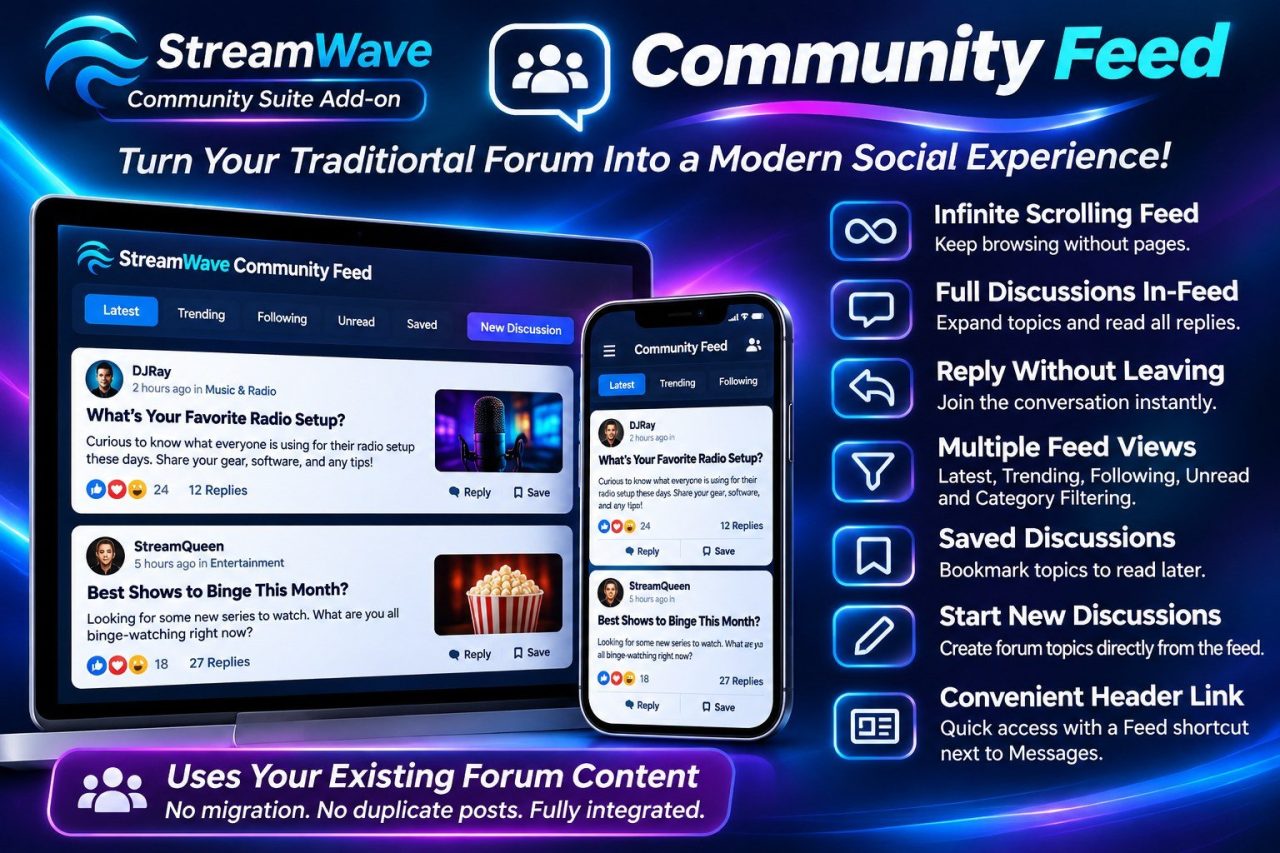
This powerful add-on transforms existing forum topics and replies into a Facebook-style social timeline, allowing members to browse discussions, read replies, react to posts, and participate directly from one continuously scrolling feed.
Instead of navigating through multiple categories and individual discussion pages, members can enjoy a streamlined social experience without losing the benefits of a traditional forum.
Best of all, Community Feed works with your existing forum content!
No discussion migration. No duplicate posts. No separate social networking database.
Just your existing community, presented in an entirely new way.
 Infinite Scrolling Social Timeline
Say goodbye to constantly clicking through pages!Community Feed introduces an automatically loading timeline that displays forum discussions in a modern social feed layout.
Features include:
- Automatic loading of additional discussions as members scroll.
- Modern social-style discussion cards.
- Smooth, continuous content browsing.
- Loading indicators.
- Manual Load More fallback.
- Persistent filters while loading additional content.
- Responsive layouts for desktop, tablet, and mobile.
 Full Discussions Without Leaving the Feed
Community Feed makes reading conversations faster and more convenient.Click a discussion title to expand the conversation directly within the timeline.
Members can:
- View the original discussion.
- Read existing replies.
- Follow responses in chronological order.
- See member usernames and posting times.
- Load additional replies in longer discussions.
- Expand conversations without opening another page.
 Reply Directly From the Timeline
Keep conversations flowing without interrupting the browsing experience.Members can submit replies directly beneath discussions.
Inline Reply Features
- Write replies without leaving the feed.
- Submit responses through the existing forum posting system.
- Preserve the member's scrolling position.
- Display confirmation after successful submission.
- Retain typed replies if submission fails.
 Multiple Feed Discovery Options
Give members more control over the discussions they see.Community Feed includes several discovery options.
 Latest Feed
Browse recent community discussions and discover newly created topics. Trending Feed
Explore popular and active conversations attracting community attention. Following Feed
Focus on discussions associated with members you follow. Unread Feed
Find discussions you haven't read yet. Category Filtering
Browse discussions from specific forum categories.These options help members discover relevant conversations without manually navigating the entire forum structure.
 Reactions & Community Engagement
Encourage members to participate through familiar social interactions.Community Feed integrates with the forum's existing reaction functionality.
Members can react to discussions while keeping their interactions connected to the original forum content.
This allows the social timeline to enhance existing community engagement rather than creating a disconnected reaction system.
 Save Discussions for Later
Found something interesting but don't have time to read it?Community Feed includes a saved-discussions feature.
Members can bookmark topics they want to revisit, including:
- Tutorials and guides.
- Community announcements.
- Interesting conversations.
- Helpful discussions.
- Favorite topics.
 Create New Discussions From the Feed
Community Feed isn't just for browsing existing content.Members can also start new forum discussions directly from the social feed experience.
New topics remain part of the existing forum structure.
This means discussions created through Community Feed continue to appear in the traditional forum as well.
One forum database. Two convenient ways to participate.
Convenient Header Navigation Shortcut
Version 1.0.4 introduces a dedicated Feed shortcut in the forum header!A new
Feed link appears in the top-right member navigation beside Messages.Benefits include:
- Quick access to the social timeline.
- Convenient navigation from the main forum.
- Styling that follows the existing header.
- Responsive positioning across supported screen sizes.
 Fully Theme-Responsive Design
Community Feed is designed to blend with your active StreamWave Community Suite theme.Its interface adapts to:
- Dark community themes.
- Light community themes.
- Custom theme color schemes.
- Desktop browsers.
- Tablet displays.
- Mobile devices.
 Built Around Your Existing Forum
Unlike standalone social networking systems, Community Feed enhances the community you already operate.It integrates with existing:
- Forum topics.
- Discussion replies.
- Member accounts and sessions.
- Forum posting functionality.
- Discussion categories.
- Reaction functionality.
- Community content and database.
No separate social platform is required.
 Key Features at a Glance
 Facebook-style forum timeline.
- Infinite scrolling.
- Automatic discussion loading.
- Manual Load More fallback.
- Expandable full discussions.
- Chronological reply viewing.
- Inline replies.
- Preserved scrolling position.
- Reply recovery after failed submissions.
- Latest discussions feed.
- Trending discussions feed.
- Following feed.
- Unread discussions feed.
- Category filtering.
- Existing forum reactions.
- Saved discussions.
- Create new topics from the feed.
- Top-right header Feed shortcut.
- Existing member account integration.
- Existing forum database integration.
- Theme-responsive interface.
- Desktop, tablet, and mobile support.
 Why Choose StreamWave Community Feed?
Traditional forums are excellent for organizing conversations, but modern members increasingly expect faster and more interactive ways to discover content.Community Feed bridges that gap.
For Community Members
Enjoy easier content discovery, convenient inline replies, and a familiar social timeline. For Administrators
Provide a modern community interface while continuing to use existing discussions, permissions, and forum functionality. For Community Owners
Refresh the experience of an established forum without migrating content to an entirely different social networking platform.Community Feed combines traditional forum organization with the convenience of modern social networking.
 Perfect For
StreamWave Community Feed is ideal for:- Gaming communities.
- Music and internet radio forums.
- Entertainment communities.
- Technology discussion boards.
- Hobby groups.
- Creator communities.
- General social forums.
- Established discussion communities seeking a modern interface.
 Installation & Upgrades
StreamWave Community Feed is distributed as an installable StreamWave Community Suite add-on.Installation
- Download the Community Feed ZIP package.
- Open the StreamWave Community Suite Add-on Manager.
- Upload and install the package.
- Enable the add-on if required.
- Access the feed through its community link or top-right header shortcut.
 Version History
Version 1.0.1 — Infinite Scrolling
Introduced automatic loading of additional discussions as members scroll.Version 1.0.2 — Inline Replies
Added the ability to reply directly within the social timeline without leaving the feed.Version 1.0.3 — Full Conversation Viewing
Introduced expandable discussion threads and reply viewing directly within the feed.Version 1.0.4 — Header Navigation Integration
Added the dedicated Feed shortcut to the top-right member navigation beside Messages. Give Your Forum a Social Network Experience!
Transform the way members discover, read, and participate in community discussions.Combine the organization of traditional forums with the convenience of a modern social timeline.
One Timeline. Endless Discussions. Convenient Replies. Familiar Interactions.
StreamWave Community Feed v1.0.4
Your Forum. Your Conversations. Your Social Timeline.Bring your community conversations together in one interactive feed!
 Technical Information
Product: StreamWave Community FeedVersion: 1.0.4
Product Type: Community Suite Add-on
Category: Social Networking / Community Engagement
Platform: StreamWave Community Suite
Installation: Community Suite Add-on Manager
Content Source: Existing forum topics and replies
Member Accounts: Existing Community Suite accounts
Infinite Scrolling: Included
Inline Replies: Included
Expandable Discussions: Included
Saved Discussions: Included
Feed Navigation Shortcut: Included
Theme Responsive: Yes
Mobile Responsive: Yes
Compatibility Notice: This product is designed for StreamWave Community Suite and is not a native XenForo add-on.
Developed for StreamWave Community Suite.
Official Community: https://streamwaveforums.com/forums.php
© 2026 StreamWave Community Suite. All rights reserved.
Reviews
No reviews yet
- Last updated
- Category
- Addons
- Sales
- 0
- Support
- 90 days after purchase