StreamWave Support Suite
Support
Overview
- 📋 Technical Information
- Product: Community Support Desk
- Version: 1.0.1
- Category: Administration & Member Support
- Product Type: Community Suite Add-on
- Platform: StreamWave Community Suite
- Installation: Community Suite Add-on Manager
- Access: Members, Support Staff & Administrators
- Support Departments: Configurable
- Ticket Priorities: Low, Normal, High, Urgent
- Staff Assignment: Supported
- Internal Staff Notes: Included
- Canned Responses: Included
- File Attachments: Supported
- Community Notifications: Integrated
- Theme Responsive: Yes
- Mobile Responsive: Yes
- Compatibility Notice: Community Support Desk is designed for StreamWave Community Suite. It is not a native XenForo add-on.
 Community Support Desk
Because Every Member Deserves Great Support!
Version 1.0.1 — Professional Support Ticket & Help Desk Management SystemTransform your community into a professional customer support experience!
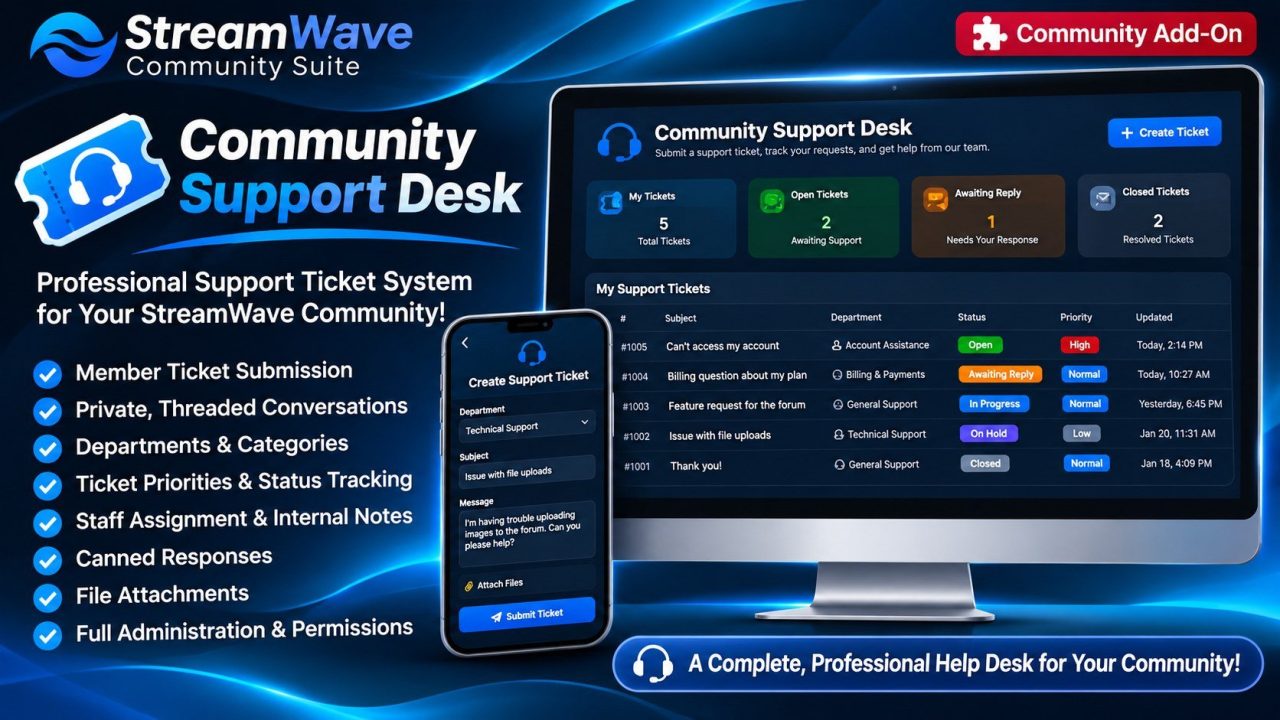
Take your community's member support to the next level with Community Support Desk, a powerful ticket management system designed exclusively for StreamWave Community Suite.
Whether you're handling technical questions, billing inquiries, account problems, marketplace issues, or general member assistance, Community Support Desk provides the tools to organize requests, communicate professionally, and deliver dependable support without leaving your forum.
Say goodbye to lost support messages, cluttered inboxes, and disorganized requests.
One Community. One Help Desk. Complete Support Management.
Professional Support Ticket Management
Give members a dedicated place to request assistance and track their support conversations.Ticket Management Features
- Easy Ticket Creation — Submit detailed support requests through a dedicated interface.
- Unique Ticket Tracking — Keep every support conversation organized with its own ticket record.
- Private Conversations — Communicate securely with authorized support staff.
- File Attachments — Upload screenshots and supporting files.
- Ticket Priorities — Classify requests as Low, Normal, High, or Urgent.
- Ticket Status Tracking — Follow requests from submission through resolution.
- Complete Conversation History — Keep replies and updates together.
 Dedicated Staff Help Desk
Give your support team the tools they need to work efficiently!Community Support Desk includes staff-focused management features for moderators, administrators, and authorized support agents.
 Organized Staff Queues
View and organize support requests according to:- Ticket status.
- Priority level.
- Support department.
- Assigned staff member.
 Ticket Assignment
Assign individual tickets to support agents.Each request can have a designated staff member responsible for handling the issue.
This improves accountability and helps prevent requests from being overlooked.
 Private Internal Staff Notes
Support agents can collaborate using internal notes that are hidden from the member who submitted the ticket.Staff can share troubleshooting information, document findings, and coordinate responses without exposing internal discussions.
 Canned Responses
Respond faster with professionally prepared replies!Save frequently used responses and insert them into support conversations.
Ideal for:
- Installation assistance.
- Common troubleshooting instructions.
- Billing questions.
- Account assistance.
- Marketplace support.
- General support information.
 Priority Management & Escalation
Identify urgent issues and organize support workloads.Tickets can be prioritized and escalated to the appropriate department or representative when additional assistance is required.
 Customizable Support Departments
Organize your support operation around your community's needs!Community Support Desk allows administrators to configure dedicated support departments.
Suggested departments include:
 General Support — Everyday questions and assistance.
 Technical Support — Software and website troubleshooting.
 Billing & Payments — Purchase and payment inquiries.
- Account Assistance — Member account questions.
- Community & Moderation — Community-related concerns.
 Marketplace Support — Digital resource and download assistance.
 Support Ticket Attachments
Make troubleshooting easier with supporting files!Members can attach screenshots and relevant files to their support requests.
Attachments help support staff understand reported problems and provide more accurate assistance.
This is especially useful for:
- Software installation errors.
- Website display issues.
- Technical troubleshooting.
- Resource download problems.
- Account-related questions.
 Community Notifications
Keep members informed when their support requests receive attention.Community Support Desk is designed to communicate ticket activity through the existing community notification system.
Notification-related features include:
- Ticket update awareness.
- Staff response notifications.
- Integration with existing member accounts.
- Convenient access to ongoing support conversations.
 Convenient Header Support Shortcut
Help is always within reach!Community Support Desk includes a dedicated Support Tickets shortcut in the forum's top-right navigation.
This provides members with quick access to the help desk while browsing their community.
Benefits include:
- Easy access to support tickets.
- Convenient navigation.
- Consistent forum header integration.
- Faster access to existing requests.
 Comprehensive Administration & Management
Community Support Desk includes administrative tools for managing support operations.Administrators can:
- Configure support departments.
- Manage ticket priorities.
- Manage ticket statuses.
- Assign and reassign tickets.
- Create and maintain canned responses.
- Review support conversations.
- Add private staff notes.
- Manage support permissions.
- Track ticket activity.
- Review resolution history.
 Fully Theme-Responsive Design
Community Support Desk is designed to complement the active StreamWave Community Suite theme.The interface supports:
- Dark community themes.
- Light community themes.
- Custom theme colors.
- Responsive desktop layouts.
- Tablet displays.
- Mobile browsers.
 Existing Member Account Integration
Members use their regular StreamWave Community Suite accounts to access the support system.There is no need for a separate help desk registration process.
The system supports different access levels for:
- Community members.
- Authorized support staff.
- Administrators.
 Key Features at a Glance
 Professional support ticket system.
- Easy member ticket creation.
- Unique ticket tracking.
- Private support conversations.
- File attachments.
- Low, Normal, High, and Urgent priorities.
- Ticket status tracking.
- Complete conversation history.
- Dedicated staff help desk.
- Organized staff queues.
- Ticket assignment.
- Private internal staff notes.
- Canned responses.
- Ticket escalation.
- Customizable support departments.
- Community notification integration.
- Top-right Support Tickets shortcut.
- Administrator management controls.
- Support access permissions.
- Ticket activity tracking.
- Resolution history.
- Existing member account integration.
- Automatic database initialization.
- Theme-responsive interface.
- Desktop, tablet, and mobile support.
 Why Choose Community Support Desk?
A successful community needs more than great discussions.It needs a dependable way for members to request assistance and receive support.
Keep Requests Organized
Give every support issue a dedicated ticket and conversation history. Empower Your Support Team
Provide staff queues, assignments, internal notes, and reusable responses. Protect Private Conversations
Keep member support discussions separate from public forum topics. Improve Support Efficiency
Organize priorities, departments, and staff responsibilities. Keep Support Within Your Community
Use existing member accounts and community navigation without relying on a separate help desk platform.Community Support Desk brings organization, accountability, and professionalism to your community's support experience.
 Easy Installation & Requirements
Community Support Desk is distributed as a standalone StreamWave Community Suite add-on.Installation
- Download the Community Support Desk ZIP package.
- Open your StreamWave Community Suite Add-on Manager.
- Upload and install the add-on.
- Configure support departments and staff permissions.
- Members can begin submitting support tickets.
Installation Features
- Add-on Manager installation.
- Automatic database initialization.
- No separate member registration.
- No manual SQL installation.
- No replacement of core forum PHP files required for the support system itself.
Technical Information
Product: Community Support DeskVersion: 1.0.1
Category: Administration & Member Support
Product Type: Community Suite Add-on
Platform: StreamWave Community Suite
Installation: Community Suite Add-on Manager
Access: Members, Support Staff & Administrators
Support Departments: Configurable
Ticket Priorities: Low, Normal, High, Urgent
Staff Assignment: Supported
Internal Staff Notes: Included
Canned Responses: Included
File Attachments: Supported
Community Notifications: Integrated
Theme Responsive: Yes
Mobile Responsive: Yes
Compatibility Notice: Community Support Desk is designed for StreamWave Community Suite. It is not a native XenForo add-on.
 Give Your Community the Support It Deserves!
Whether you're running a small private forum or a growing online community, Community Support Desk helps you deliver a more organized, professional, and accessible support experience.Keep conversations private.
Keep requests organized.
Keep your support team connected.
Deliver the professional support experience your members deserve!
Community Support Desk v1.0.1
Your Members. Your Support Team. One Professional Help Desk.Because Every Member Deserves Great Support!
Developed for StreamWave Community Suite.
Official Community: https://streamwaveforums.com
© 2026 StreamWave Community Suite. All rights reserved.
Reviews
No reviews yet