Virtual Stock Exchange Pro
Become a Virtual Millionaire
Overview
- Product Information
- Product: Virtual Stock Exchange Pro
- Current Version: 1.0.4
- Developer: StreamWave Development
- Platform: XenForo 2.3
- Installation: Standard XenForo add-on archive
- Database: Native XenForo MySQL storage
- Starting Virtual Capital: $100,000
- Stock and ETF Trading: Yes
- Limit and Stop Orders: Yes
- Portfolio Analytics: Yes
- Market Watch Ticker: Yes
- Twelve Data Integration: Yes
- Personal Watchlists: Yes
- Trading History: Yes
- Private Trading Journal: Yes
- Capital Recovery: Yes
- Seasonal Championships: Yes
- Community Leaderboard: Yes
- Dedicated Administration Center: Yes
- Native Usergroup Permissions: Yes
- Theme Responsive: Yes
- Real-Money Trading: No
Virtual Stock Exchange Pro – XenForo 2.3
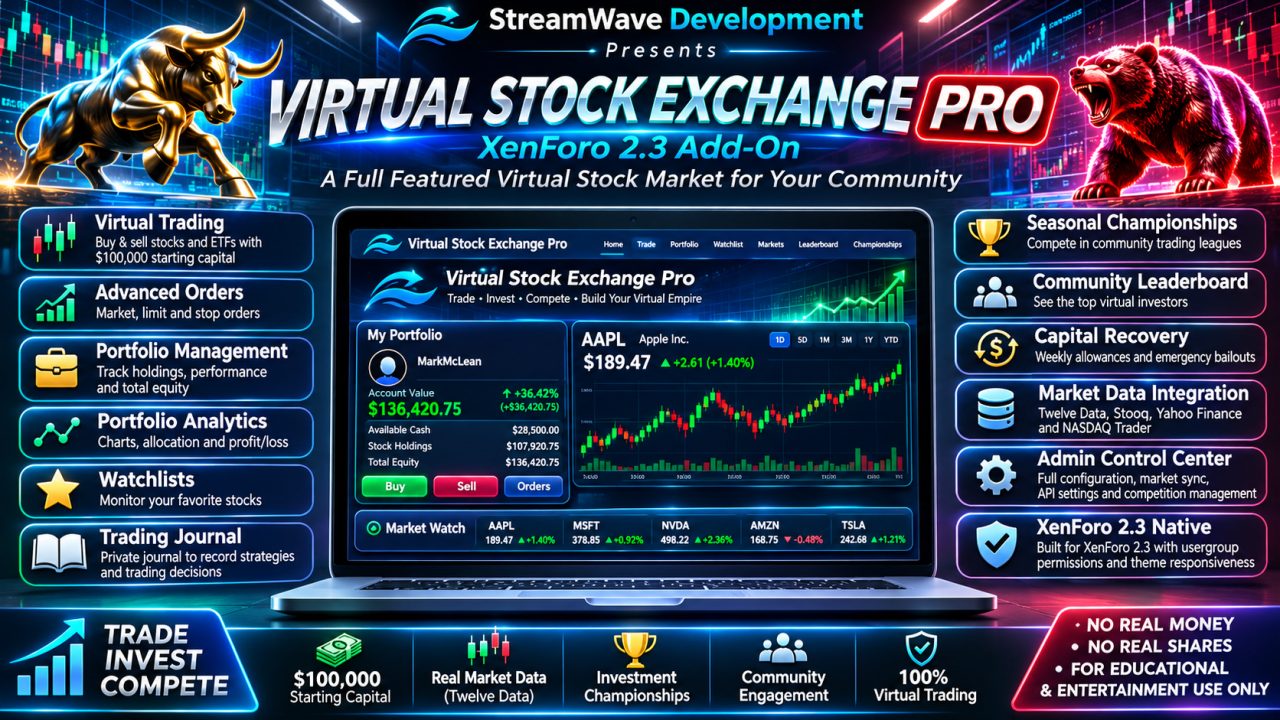
Trade. Invest. Compete. Build Your Virtual Financial Empire.Virtual Stock Exchange Pro is an advanced stock market simulation and community engagement add-on developed by StreamWave Development for XenForo 2.3.
Transform your online community into an interactive virtual financial marketplace where members can buy and sell simulated stocks, build investment portfolios, monitor market prices, develop trading strategies and compete against fellow community members.
Using external financial market data, Virtual Stock Exchange Pro provides an engaging and educational trading experience without requiring members to risk real money.
Every participant begins with $100,000 in virtual trading capital, giving members the opportunity to explore the stock market, experiment with investment strategies and compete to become their community's most successful virtual investor.
Virtual Trading Accounts
Each participating member receives their own virtual trading account.- $100,000 starting virtual capital.
- Individual investment portfolios.
- Available trading balance.
- Total portfolio valuation.
- Stock and ETF holdings.
- Investment profit and loss tracking.
- Individual transaction history.
- Independent member accounts.
All funds and investments are entirely virtual and have no real-world monetary value.
Advanced Stock Trading Terminal
The integrated trading terminal provides members with the tools needed to participate in simulated financial markets.Trading functionality includes:
- Buy virtual stocks.
- Sell existing stock holdings.
- Trade supported ETFs.
- Search for supported stock symbols.
- Retrieve available market quotes.
- Review estimated transaction values.
- Monitor available trading capital.
- View existing investments.
- Review completed transactions.
Advanced Trading Orders
Virtual Stock Exchange Pro supports additional trading order types, allowing members to experiment with more advanced investment strategies.Market Orders
Buy or sell virtual shares using an available reference market price.Limit Orders
Specify a target price at which a simulated purchase or sale should execute when the applicable conditions are met.Stop Orders
Configure price-triggered orders to help manage virtual investment positions and experiment with risk-management strategies.Order execution depends on available market data and the add-on's order-processing routines. Simulated execution does not guarantee the same results as a real brokerage platform.
Market Watch Stock Ticker
Keep your community informed with an integrated Market Watch ticker displaying available stock market prices.The ticker provides:
- Stock symbols.
- Available reference prices.
- Price change information when supplied.
- Automatic rotating quote refreshes.
- Cached market prices.
- Market-data availability indicators.
- Theme-responsive presentation.
Market Watch is informational and does not directly determine virtual order execution prices.
External Market Data Integration
Virtual Stock Exchange Pro supports multiple external financial data sources.Twelve Data
Configure your Twelve Data API key to retrieve supported market quotes and populate the Market Watch ticker.Features include:
- Configurable API credentials.
- Server-side connection testing.
- Cached market quotes.
- Rotating symbol requests.
- API authentication diagnostics.
- Rate-limit error handling.
- Public display configuration.
Stooq
Provides delayed or end-of-day reference market prices where available.Yahoo Finance
Provides an additional historical price fallback where available.NASDAQ Trader
Provides stock exchange directory information for supported market listings.External data availability depends on the provider, subscription level, API restrictions and applicable market-data licensing requirements.
Stock Market Directory
Explore supported financial instruments through the integrated market directory.Members can discover companies and ETFs, search for trading symbols and identify potential virtual investment opportunities.
Administrators can synchronize supported market listings through the administration center.
Portfolio Management
Every member receives an individual portfolio management environment.Portfolio information includes:
- Available virtual cash.
- Existing stock holdings.
- Share quantities.
- Investment values.
- Total portfolio equity.
- Profit and loss information.
- Investment allocation.
- Portfolio performance.
Portfolio Analytics
Virtual Stock Exchange Pro includes portfolio analytics designed to help members evaluate their trading performance.Analytics allow members to explore:
- Overall portfolio performance.
- Investment allocation.
- Individual holding performance.
- Profit and loss.
- Changes in portfolio value.
Personal Stock Watchlists
Members can create personal watchlists to monitor companies and financial instruments they are interested in.Watchlists provide a convenient way to follow potential investment opportunities without immediately purchasing virtual shares.
Trading History
Maintain a record of completed virtual trading activity.Members can review previous purchases and sales, examine their trading decisions and track their investment journey.
The individual transaction ledger provides a historical reference for evaluating trading strategies.
Community Investor Leaderboard
Introduce friendly financial competition to your XenForo community.The integrated leaderboard allows members to compare virtual portfolio performance and compete to become the community's leading investor.
Encourage members to develop investment strategies, monitor their portfolios and participate regularly.
Capital Recovery System
The capital recovery system helps maintain long-term participation by providing configurable recovery opportunities for members who experience significant virtual trading losses.Recovery features include:
- Weekly virtual capital allowances.
- Emergency bailout functionality.
- Administrator-configurable recovery settings.
Seasonal Trading Championships
Create organized investment competitions within your community.Seasonal championships provide an additional competitive environment where members can participate using separate competition portfolios.
Administrators can organize investment challenges and encourage members to compete throughout a championship season.
Example competitions include:
- Monthly Investor Championship.
- Annual Virtual Trading Championship.
- Technology Stock Challenge.
- Winter Investment League.
- Community Portfolio Challenge.
Private Trading Journal
Members can maintain a private trading journal to document their investment strategies and decisions.Trading journals can be used to record:
- Reasons for purchasing stocks.
- Reasons for selling investments.
- Investment strategies.
- Market observations.
- Trading goals.
- Lessons learned.
- Personal performance evaluations.
Dedicated Administration Center
Virtual Stock Exchange Pro includes a dedicated administration center for managing the virtual trading environment.Administrative functionality includes:
- Market-data provider configuration.
- Twelve Data API key management.
- API connection testing.
- Market directory synchronization.
- Market Watch ticker configuration.
- Market-data public display settings.
- Capital recovery configuration.
- Seasonal championship management.
- Voting-free, portfolio-based community competition management.
Native XenForo Usergroup Permissions
Virtual Stock Exchange Pro integrates with XenForo's native usergroup permission system.Administrators can independently configure access to the exchange and participation in virtual trading.
This allows the exchange to be offered to:
- Registered members.
- Premium members.
- VIP members.
- Selected community groups.
- Moderators.
- Administrators.
Theme-Responsive Interface
Virtual Stock Exchange Pro is designed to complement your existing XenForo theme.The interface uses theme-responsive styling for:
- Trading panels.
- Market Watch ticker.
- Portfolio information.
- Market directory.
- Trading forms.
- Leaderboards.
- Watchlists.
- Championship pages.
- Buttons and navigation.
Installation Instructions
Installing Virtual Stock Exchange Pro
- Download the Virtual Stock Exchange Pro installation ZIP.
- Log in to your XenForo Admin Control Panel.
- Navigate to Add-ons.
- Select Install/upgrade from archive.
- Upload the supplied ZIP archive.
- Complete the XenForo installation process.
- Configure the appropriate usergroup permissions.
- Open the Virtual Stock Exchange administration center.
- Configure your market-data providers.
- Synchronize the market directory.
Upgrading an Existing Installation
- Back up your XenForo database and website files.
- Download the latest Virtual Stock Exchange Pro upgrade.
- Navigate to Admin CP → Add-ons → Install/upgrade from archive.
- Upload the new ZIP.
- Complete the upgrade process.
Administrator Operating Instructions
Step 1 – Access the Administration Center
Log in to your XenForo Admin Control Panel and locate the Virtual Stock Exchange Pro administration section.The administration center can also be accessed directly at:
https://yourdomain.com/admin.php?virtual-exchange/
Replace yourdomain.com with your XenForo installation address.
Step 2 – Configure Usergroup Permissions
Navigate to:Admin CP → Groups & permissions → User group permissions
Select the usergroup you wish to configure and locate the Virtual Stock Exchange permissions.
Grant viewing and trading permissions according to your community requirements.
Recommended Permission Configuration
| Usergroup | View exchange | Virtual trading |
|---|---|---|
| Guests | Optional | No |
| Registered members | Yes | Yes |
| Premium members | Yes | Yes |
| VIP members | Yes | Yes |
| Moderators | Yes | Yes |
| Administrators | Yes | Yes |
Step 3 – Obtain a Twelve Data API Key
Twelve Data provides external financial market data that can be used by the exchange.- Visit https://twelvedata.com/.
- Create a Twelve Data account.
- Review the available subscription plans.
- Obtain your API key.
- Confirm that your subscription supports your intended market-data usage.
- Confirm whether your subscription permits public display or redistribution of financial market data.
A free API account does not necessarily grant permission to redistribute market data publicly.
Step 4 – Configure Twelve Data
Open the Virtual Stock Exchange administration center.- Locate the market-data settings.
- Enter your Twelve Data API key.
- Configure the Market Watch settings.
- Enable public display only if permitted by your market-data subscription.
- Save your settings.
- Select Test saved Twelve Data connection.
The current version also attempts to store the successful AAPL test quote in the ticker cache.
Never share your private API key with members or publish it in forum discussions.
Step 5 – Synchronize the Market Directory
Open the market directory synchronization controls in the administration center.Run the synchronization process to populate or update the supported stock market directory.
Once synchronization has completed, members can search the available financial instruments through the exchange.
Directory availability and quote availability are separate. A listed stock may not necessarily have an available quote through your configured data provider.
Step 6 – Configure Market Watch
Review the ticker settings in the administration center.Ensure that:
- Your Twelve Data API key is saved.
- The connection test succeeds.
- Public market-data display is permitted and enabled.
- Your subscription has sufficient API credits.
Cached prices are retained where possible, and symbols with available prices are prioritized.
Allow time for the ticker to populate, particularly when a large number of stock symbols are configured.
Step 7 – Configure Capital Recovery
Open the capital recovery settings.Review the available weekly allowance and emergency bailout options.
Configure recovery opportunities that suit your community's competition style.
For a casual educational community, more generous recovery opportunities may encourage continued participation.
For a competitive trading community, stricter recovery settings may provide a greater challenge.
Step 8 – Create Seasonal Championships
Open the championship management section.Create a new seasonal trading competition and configure the available season settings.
Suggested championship names include:
- StreamWave Investor Championship.
- Wall Street Virtual Challenge.
- Ultimate Trader League.
- Summer Stock Market Championship.
- Million Dollar Portfolio Challenge.
Step 9 – Monitor Exchange Operations
Administrators should periodically review:- Market-data connectivity.
- API request limits.
- Available market quotes.
- Community participation.
- Portfolio rankings.
- Capital recovery settings.
- Seasonal competition activity.
Member Operating Instructions
Accessing the Virtual Stock Exchange
Members can access the exchange through the community navigation menu, subject to their usergroup permissions.The exchange can also be accessed directly at:
https://yourdomain.com/index.php?virtual-exchange/
Starting Your Investment Journey
Each participating member begins with $100,000 in virtual trading capital.Before making your first trade:
- Review your available virtual balance.
- Explore the market directory.
- Search for companies you are interested in.
- Review available stock prices.
- Consider how much virtual capital you wish to invest.
Buying Virtual Stocks
- Open the trading terminal.
- Search for a supported stock symbol.
- Review the available reference quote.
- Enter the number of shares you wish to purchase.
- Review the estimated transaction value.
- Submit the purchase.
If a valid market quote is unavailable, the transaction may not be processed.
Selling Virtual Stocks
- Open your investment portfolio or trading terminal.
- Select a stock you currently own.
- Enter the number of shares you wish to sell.
- Review the available reference quote.
- Submit the sale.
Using Limit Orders
Limit orders allow you to specify a desired trading price.For example, if a stock is currently valued at $150, you could create a simulated purchase limit order at $140.
The order becomes eligible for execution when the relevant price conditions are met, subject to available market data and order processing.
Using Stop Orders
Stop orders allow members to experiment with price-triggered trading strategies.For example, a member holding a stock valued at $100 could configure a stop order at $90 to explore how a price-triggered exit strategy works.
Actual simulated execution prices may differ from the trigger price.
Managing Your Portfolio
Open your portfolio page to review your current investment positions.Monitor:
- Available virtual cash.
- Existing share holdings.
- Investment values.
- Portfolio equity.
- Profit and loss.
- Investment allocation.
Creating a Watchlist
Search for companies or financial instruments you are interested in and add them to your personal watchlist.Use your watchlist to monitor potential investments before committing virtual capital.
Reviewing Your Trading History
Open your trading history to review completed transactions.Use this information to evaluate previous decisions and identify areas where your virtual trading strategy could improve.
Maintaining a Trading Journal
Open your private trading journal and record your investment observations.For example:
Stock: AAPL
Strategy: Long-term virtual investment.
Reason for purchase: Experimenting with an established technology company as part of a diversified simulated portfolio.
Objective: Monitor performance over the next month.
Review: Evaluate the outcome and record lessons learned.
Keeping a journal can help members develop more structured investment strategies.
Participating in Championships
When a seasonal championship is available, eligible members can participate in the competition using its separate virtual trading environment.Monitor championship rankings and compete against other community members throughout the season.
Viewing the Leaderboard
Visit the investor leaderboard to compare virtual portfolio performance with other participating members.Use the leaderboard as motivation to improve your simulated trading strategies and participate in friendly community competition.
Troubleshooting Guide
Quote Service Unavailable
If market quotes are unavailable:- Confirm that your Twelve Data API key is saved.
- Run the ACP connection test.
- Check your API credit allowance.
- Verify that the requested stock symbol is supported.
- Check whether the external data provider is experiencing service interruptions.
- Confirm outbound HTTPS connections are permitted by your hosting environment.
Market Watch Displays Unavailable Prices
The ticker may require time to populate its cache.Run the saved Twelve Data connection test from the administration center, then refresh the exchange page.
Additional symbols are requested through the rotating refresh routine.
If prices remain unavailable, investigate the ticker refresh process and provider response messages.
No Price Change Data
Some market-data responses may provide a stock price without corresponding percentage or absolute change information.The ticker may display No change data when this information is unavailable.
Members Cannot Access the Exchange
Review their XenForo usergroup permissions and confirm that the appropriate viewing and trading permissions have been granted.Market Directory Is Empty
Run the market directory synchronization process from the administration center.Trading Orders Cannot Be Completed
Check that:- The requested stock has an available reference quote.
- The member has sufficient virtual funds.
- The member owns sufficient shares when selling.
- The member has trading permission.
- The relevant order conditions have been met.
Ideal Uses
Virtual Stock Exchange Pro is ideal for:- Financial discussion communities.
- Investment education forums.
- Business and entrepreneurship communities.
- Technology forums.
- Stock market enthusiast communities.
- General discussion forums.
- Educational communities.
- Virtual economy communities.
- Premium membership communities.
- Community gaming and entertainment platforms.
- Seasonal investment competitions.
Benefits for Community Owners
- Increase recurring member engagement.
- Encourage daily community visits.
- Introduce educational financial simulations.
- Create friendly member competitions.
- Provide additional premium membership opportunities.
- Encourage discussions about financial markets.
- Introduce long-term member progression.
- Create seasonal community events.
- Provide entertainment without real-money trading.
Technical Requirements
- XenForo 2.3.
- Compatible PHP environment.
- MySQL or MariaDB supported by XenForo.
- Outbound HTTPS connectivity.
- Appropriate XenForo administrative permissions.
- Twelve Data API credentials for the Twelve Data integration.
- Appropriate market-data licensing for public quote display.
Important Simulation Disclaimer
Virtual Stock Exchange Pro is designed exclusively for educational, entertainment and community engagement purposes.- No real stocks or financial securities are purchased.
- No real brokerage accounts are created.
- No real-money deposits or withdrawals are supported.
- Virtual funds have no monetary value.
- Virtual profits cannot be exchanged for cash.
- Market prices may be delayed, incomplete or inaccurate.
- Simulated trading results may differ substantially from real-world investment performance.
Product Information
Product: Virtual Stock Exchange ProCurrent Version: 1.0.4
Developer: StreamWave Development
Platform: XenForo 2.3
Installation: Standard XenForo add-on archive
Database: Native XenForo MySQL storage
Starting Virtual Capital: $100,000
Stock and ETF Trading: Yes
Limit and Stop Orders: Yes
Portfolio Analytics: Yes
Market Watch Ticker: Yes
Twelve Data Integration: Yes
Personal Watchlists: Yes
Trading History: Yes
Private Trading Journal: Yes
Capital Recovery: Yes
Seasonal Championships: Yes
Community Leaderboard: Yes
Dedicated Administration Center: Yes
Native Usergroup Permissions: Yes
Theme Responsive: Yes
Real-Money Trading: No
Your Capital. Your Strategy. Your Virtual Empire.
Virtual Stock Exchange Pro brings the excitement, strategy and competitive nature of financial markets directly into your XenForo community.Whether your members are experienced market enthusiasts or complete beginners, the exchange provides an engaging environment where they can explore investment strategies, build virtual portfolios and compete without risking real money.
Start with $100,000. Build your portfolio. Climb the leaderboard. Become your community's ultimate virtual investor.
Developed by StreamWave Development.
Official Website: https://streamwaveforums.net
Discover the StreamWave Community Suite: https://streamwaveforums.com
StreamWave Hosting & Digital Media Services: https://streamwavehosting.com
Reviews
No reviews yet
- Last updated
- Category
- Xenforo Addons
- Sales
- 0
- Support
- 90 days after purchase