Deal or no Deal
Beat the Banker!
Overview
StreamWave Deal Pro — Deal or No Deal for XenForo 2.3
Twenty-six cases. One banker. Your decision.
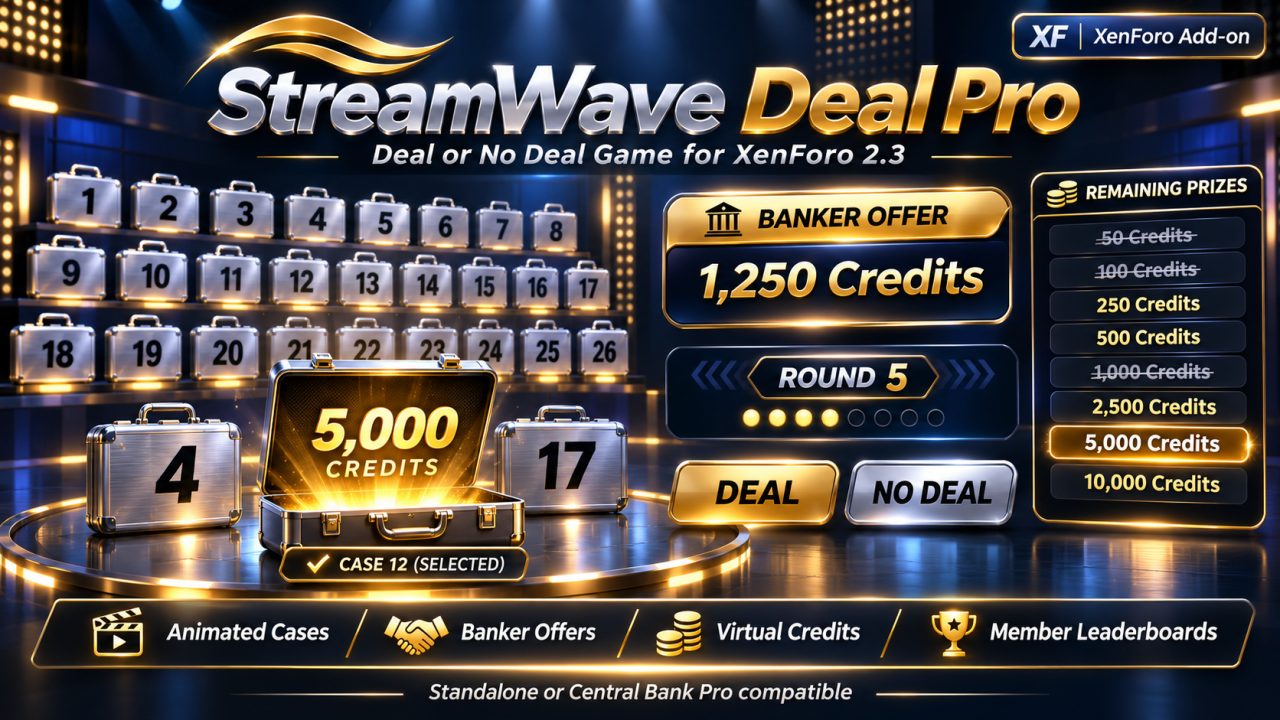
Bring the suspense of a classic television game show to your XenForo community with StreamWave Deal Pro, an interactive briefcase-opening game featuring animated metallic cases, unpredictable banker offers, virtual-credit prizes and an immersive game-show studio.Members select their personal briefcase, eliminate competing cases and decide whether to accept the banker's offer or continue playing.
Will they accept the guaranteed offer, or take their chances with their chosen case?
The decision is theirs.
Premium game-show experience
StreamWave Deal Pro recreates the excitement of the classic case-opening game format within your community.Features include:
- 26 individually numbered metallic briefcases.
- Animated briefcase-opening sequences.
- Hidden credit values.
- Personal briefcase selection.
- Nine banker offer rounds.
- Deal and No Deal decisions.
- Interactive remaining-prize board.
- Eliminated prize indicators.
- Final keep-or-swap decision.
- Automatic prize settlement.
- Persistent game sessions.
- Personal game history.
- Member leaderboard.
- Premium sidebar widget.
- Responsive desktop and mobile interface.
Animated briefcases
Each game begins with 26 closed briefcases containing hidden values.Members select one case to keep as their personal briefcase before opening the remaining cases throughout successive rounds.
When a case is selected, its opening animation reveals the credit value inside.
The corresponding prize is eliminated from the remaining-prize board, giving the player a visual overview of the possible values still in play.
Case values are assigned securely on the server and unopened values remain hidden until they are revealed or the game concludes.
The banker
At the end of each round, the banker calculates an offer based on the remaining case values and the current stage of the game.The player must decide:
DEAL
Accept the banker's current offer and end the game with the offered virtual-credit prize.
NO DEAL
Reject the offer and proceed to the next round.
After the final banker offer is rejected, the member can keep their original briefcase or exchange it for the final remaining case.
Nine rounds of gameplay
| Round | Cases to open |
|---|---|
| Round 1 | 6 |
| Round 2 | 5 |
| Round 3 | 4 |
| Round 4 | 3 |
| Round 5 | 2 |
| Round 6 | 1 |
| Round 7 | 1 |
| Round 8 | 1 |
| Round 9 | 1 |
Persistent game sessions
Members do not have to complete their game in one visit.They can leave the game studio, browse the forums and return to their saved game later.
Saved information includes:
- Personal briefcase.
- Previously opened cases.
- Remaining prize values.
- Current round.
- Previous banker offers.
- Pending banker decision.
- Original entry fee.
- Original currency and prize multiplier.
Flexible economy support
StreamWave Deal Pro does not require Central Bank Pro to operate.Standalone virtual credits
The built-in economy allows Deal Pro to operate independently on any compatible XenForo community.Features include:
- Initial treasury of 1,000,000 virtual credits.
- Independent member wallets.
- Username-based administrator credit allocations.
- Automatic entry deductions.
- Automatic prize settlements.
- Prize reserve accounting.
- Transaction history.
- Financial reconciliation.
Central Bank Pro integration
Communities using StreamWave Central Bank Pro can connect Deal Pro to their existing virtual economy.Integration includes existing wallets, configured currency providers, automatic payouts and centralized financial accounting.
DragonByte Credits and XENTR Credits can be used through compatible Central Bank Pro configurations. Direct standalone integration with these third-party credit add-ons is not currently included.
Free-to-play mode
Administrators can allow members to play without paying any entry fee.Free games record results as scores rather than awarding spendable credits.
Configurable game settings
Administrators can customize the game's financial configuration directly through the XenForo ACP.| Setting | Default |
|---|---|
| Briefcases | 26 |
| Entry fee | 300 credits |
| Minimum case value | 0 credits |
| Maximum case value | 2,000 credits |
| Prize multiplier | 1 |
| Banker rounds | 9 |
| Games per member per 24 hours | 3 |
| Simultaneous active games per member | 1 |
The daily game limit can be configured between 1 and 20 games within a rolling 24-hour period.
Financial protection
Deal Pro includes financial controls designed to protect the community economy.These include:
- Insufficient member balance protection.
- Maximum prize liability reservation.
- Dedicated prize escrow.
- Treasury balance checks.
- Transaction-scoped credit settlements.
- Duplicate-submission protection.
- Persistent currency identification.
- Financial reconciliation.
- Game history auditing.
When the game concludes, the system releases the reservation and pays the actual awarded amount.
Leaderboards and member history
Members can review their previous games and compare results with other players.The system records game outcomes, entry fees and awarded prizes.
Leaderboards use the selected currency rather than combining unrelated currency balances.
Premium sidebar widget
Promote the game directly from your forum homepage with the Deal Pro game spotlight widget.The widget includes:
- Premium game-show styling.
- Animated metallic briefcases.
- Configured maximum prize.
- Current entry fee.
- Currency information.
- Personalized saved game status.
- Active game progress.
- Pending banker offer.
- Play or Resume Game button.
- Game history navigation.
- Leaderboard navigation.
- Responsive sidebar styling.
- Reduced-motion support.
Native administration center
Deal Pro integrates directly into the XenForo Admin Control Panel.Settings & financial audit
Configure:- Game availability.
- Economy provider.
- Entry fee.
- Prize multiplier.
- Daily game limit.
- Virtual currency confirmation.
Game history
Administrators can review member games and search records by username.Standalone economy
Allocate credits to members, monitor treasury reserves and review recent virtual-credit transactions.Installation and operating instructions
1. System requirements
- XenForo 2.3.
- PHP 8.0 or higher, subject to XenForo's requirements.
- Central Bank Pro v1.5.5 or compatible version — optional.
- StreamWave Gaming Hub — optional.
2. Installing Deal Pro
- Back up your XenForo installation and database.
- Log into your XenForo Admin Control Panel.
- Navigate to Add-ons.
- Select Install/upgrade from archive.
- Upload the Deal Pro installation ZIP.
- Complete the installation.
3. Configuring user permissions
Navigate to:ACP → Groups & permissions → User group permissions
Select the appropriate member group and locate the Deal Pro permissions.
Enable:
- View Deal Pro.
- Play Deal Pro.
4. Configuring the game
Navigate to:ACP → Deal Pro → Settings & financial audit
Configure the following options:
Enable new games
Allows eligible members to start new game sessions.Disabling this option does not cancel existing active games.
Economy / currency
Select one of the available economy modes:- Standalone credits.
- Free play.
- An initialized Central Bank currency.
Entry fee
Specify the number of whole virtual credits required to begin a game.This setting is ignored in free-to-play mode.
Prize multiplier
Adjusts the value of every prize on the briefcase board.| Multiplier | Maximum prize |
|---|---|
| 1 | 2,000 credits |
| 2 | 4,000 credits |
| 5 | 10,000 credits |
| 10 | 20,000 credits |
| 25 | 50,000 credits |
| 50 | 100,000 credits |
| 100 | 200,000 credits |
Games per member in 24 hours
Controls the maximum number of games a member can start within a rolling 24-hour period.The default is three games.
Virtual currency confirmation
Confirm that the selected currency cannot be purchased with money, redeemed for cash or exchanged for goods of monetary value.Select Save settings.
5. Allocating standalone credits
If you are using the built-in economy, navigate to:ACP → Deal Pro → Allocate standalone credits
Enter the member's exact username and the number of whole credits to allocate.
Select Allocate from treasury.
The member can now use their allocated credits to access paid virtual-credit games.
6. Installing the premium widget
Navigate to:ACP → Appearance → Widgets → Add widget
Select:
Deal Pro: game spotlight
Configure a widget key, title and display position.
For a traditional forum sidebar placement, select Forum list: Sidebar.
Save the widget.
7. How members play Deal or No Deal
Step 1: Enter the game studio
Select Deal or No Deal from the community navigation or Gaming Hub, where installed.Review the entry fee and available prize board.
Step 2: Start a game
Select the option to begin a new game.In credit-funded mode, the entry fee is deducted from the member's virtual-credit balance.
Step 3: Choose a personal briefcase
Select one of the 26 numbered briefcases.This case becomes the player's personal case and remains closed unless revealed at the end.
Step 4: Open the remaining cases
Choose the required number of cases for the current round.Each case reveals its hidden value and removes that amount from the remaining-prize board.
Step 5: Receive the banker's offer
After completing the round, the banker presents an offer.The member selects Deal to accept the offer or No Deal to continue.
Step 6: Final decision
If every banker offer is rejected, the member chooses whether to retain their personal case or exchange it for the final remaining case.Step 7: Receive the result
The game concludes and the outcome is recorded.In credit-funded mode, the awarded virtual credits are settled automatically.
In free-to-play mode, the result is recorded as a score.
8. Resuming an existing game
Members with an unfinished session can return through the main Deal Pro page or the sidebar widget.Select Resume Game to continue from the saved position.
9. Financial auditing
Administrators should regularly review the financial audit, particularly after modifying the economy provider, entry fee or prize multiplier.Monitor:
- Total games.
- Active games.
- Collected entry fees.
- Awarded prizes.
- Outstanding reserved liabilities.
- Escrow difference.
- Economy difference.
- Available standalone treasury.
If an existing game was funded through Central Bank Pro, the original provider must remain available until that game is settled.
Do not uninstall the add-on or manually remove reserved funds while active games remain outstanding.
StreamWave Gaming Hub integration
Deal Pro can be integrated into StreamWave Gaming Hub, providing eligible members with access alongside other installed community games.Gaming Hub integration requires the separately available Gaming Hub add-on.
Compatibility and responsible use
StreamWave Deal Pro is an independent game inspired by the popular briefcase-opening game-show format. It is not affiliated with or endorsed by the official television production.The add-on is intended exclusively for entertainment using non-purchasable, non-redeemable virtual community credits.
No real-money wagering, cash prizes or payment processing is supported.
Current release: v1.0.3
Developed by StreamWave.
Visit https://streamwaveforums.net/
Reviews
No reviews yet
- Last updated
- Category
- Xenforo Addons
- Sales
- 0
- Support
- 90 days after purchase